
MCP: A New Layer for Interacting with IoT Data
Over the past few years, IoT platforms have matured significantly: device connectivity, fleet management, telemetry, alerts, dashboards, reporting, and automation have all become standard capabilities. But this “standard” still has one common limitation: access to platform data and operations is still tightly tied to specific interfaces and predefined workflows. Users have to remember exactly where a metric is located, which section contains a rule, what a report is called, which filters to apply, and what time range to select.
At the same time, LLM assistants entered the market, and users quickly adopted a much simpler interaction model: ask a question, get an answer. But for an LLM to respond not just “in general,” but based on your actual platform data, it needs secure and controlled access to your platform’s functions and data.
This is where MCP (Model Context Protocol) comes in — a protocol that gives an LLM assistant “hands” and “eyes” inside your system.
What MCP Is in Simple Terms
MCP is a standard way to connect external tools and data sources to an LLM, so the model can:
- retrieve context (data, statistics, device status, events),
- trigger actions (request a device list, filter telemetry, get alerts for a time period, build aggregates, generate a report),
- do all of this in a predictable and controlled way — through a defined set of “tools” with clear parameters and access policies.
It’s important to clarify one thing: MCP is not “just another API.” An API is a language for developers. MCP is a bridge between an LLM and APIs that makes these interactions structured, observable, and secure for the user ↔ chat ↔ platform flow.
Why This Matters Right Now
This is especially relevant for IoT, where the challenge is more acute: there is a lot of data, it is heterogeneous, and its value often appears only after the right aggregation and filtering.
- Speed: when a question comes up right now, no one wants to open multiple screens and manually piece the picture together.
- Complexity: IoT systems involve many entities (devices, groups, locations, firmware versions, metrics, alerts, rules, users).
- Context dependence: the same question (“Why did consumption increase?”) requires context from specific time intervals and specific events.
- A new user habit: users already think in a conversational format — show, explain, compare, find deviations, suggest an action.
MCP turns this interaction model into real work with the platform — not just a “smart help search.”
MCP + KaaIoT: Chat as a Full-Fledged Interface to the Platform
In KaaIoT, users connect devices, manage them, analyze statistics, and respond to alerts. We extended this experience with an MCP layer: now users can work with platform data and functionality not only through the UI, but also through a dialog with ChatGPT — in any app or chat interface connected to the assistant’s API.
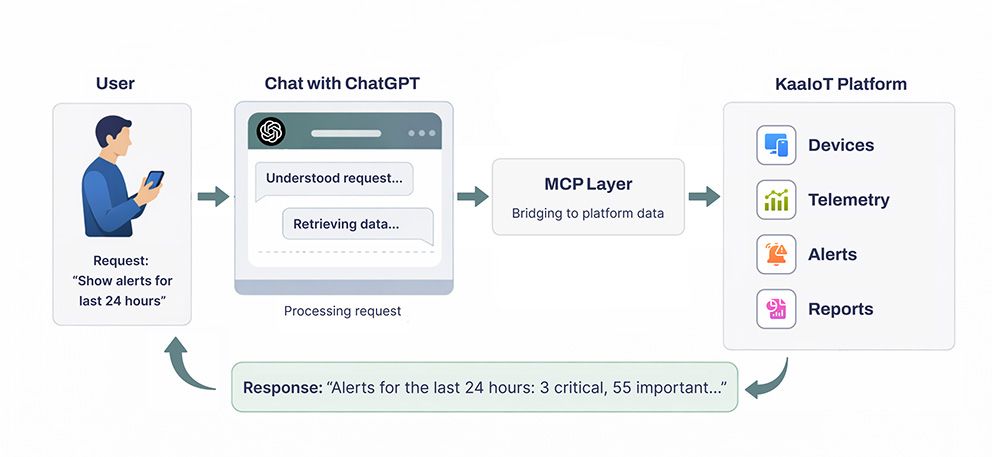
For the user, this feels very simple: they ask a question in ChatGPT, and when needed, the assistant accesses data from their KaaIoT tenant through a connected MCP server. Authentication and tenant scoping are handled via the api-key and tenant_id parameters in the MCP endpoint:
https://llm.kaaiot.com/platform/mcp? api-key =asdnd17bmkan7602nsdhbsdb& tenant_id =782jnbsm27ui
- After that, the user can ask questions in natural language and get answers based on real device data, for example:
- “Show the devices that had critical alerts in the last 24 hours and group them by location.”
- “Compare the average temperature for Line A this week vs. the previous week, and highlight deviations.”
- “Which devices flap most often (frequently go offline/online) over the month?”
- “Prepare a short alert SLA report for yesterday and suggest which rules should be tightened.”
The key point is that MCP does not give the model abstract or unrestricted access — it gives access through a set of controlled tools. This means:
- the assistant can retrieve the exact data it needs (instead of “guessing”),
- responses become verifiable (data queries are reproducible),
- access can be restricted and audited — at the level of tokens/keys, permissions, projects, device groups, and more.
What’s New About This Approach
MCP introduces a fundamentally different level of interaction: the chat becomes a universal operational layer that can do more than just answer questions — it can work with the platform itself by dynamically building queries, refining parameters, combining data sources, compiling summaries, and explaining root causes.
This is especially valuable in IoT, where analytical questions often do not have a prebuilt dashboard. MCP makes it possible to “assemble a dashboard on the fly” through a chat request.
Why This Is Convenient for Users
- Fewer context switches: instead of log in → find the section → apply filters → export → analyze, the user simply asks a question.
- Lower barrier to analytics: even complex statistical queries can be expressed in plain language.
- One interface for different roles: engineers, operators, and managers can all ask questions in their own language, while the assistant translates them into correct platform queries.
- Faster alert response: users can immediately ask what happened, how big the impact is, and what happened before it — and get a coherent answer.
Why MCP Is Better Than a Custom Bot or a Point Integration
When companies first try “chat for IoT,” the most obvious path is usually to build a custom bot or add a few manual integrations: show recent alerts, list devices, generate a temperature report. This works — but only until user requests start going beyond the predefined scenarios.
MCP changes the approach: instead of “reinventing the bot” every time, you connect ChatGPT to a standardized tool layer that scales with both the platform and the team.
Scalable Use Cases Without Rewriting Logic
A custom bot typically lives as a set of intents and handlers: a new report type means a new intent; a new filter means code changes; a platform entity changes and you get another round of fixes and regressions.
With MCP, you describe platform tools (operations) once: get alerts, fetch telemetry, aggregate metrics, get device state, build a summary. From there, ChatGPT combines them based on the user’s specific request:
- today the user asks “group by location” — the assistant applies grouping,
- tomorrow they ask “compare this week vs. last week” — the assistant adds period comparison,
- the day after they ask “find correlation with firmware version” — the assistant includes the relevant fields.
And all of this happens without you having to write a new custom “scenario” for every new question.
Faster Time-to-Value: Less Code, More Value
A custom bot almost always starts with “let’s quickly build an MVP” — but then it turns into a product within the product: you have to maintain NLU/intents, test dialog flows, and handle edge cases.
MCP offers a much shorter path:
- you publish a set of platform tools,
- connect them to ChatGPT,
- and users start getting value immediately — because they formulate requests in natural language, while the assistant selects the right tools on its own.
In other words, the core complexity moves to where it belongs: correct platform operations and access control, not endless “dialog tuning.”
Example: Inverter Monitoring App — How MCP Turns ChatGPT into a “Smart Interface” for KaaIoT Data
Let’s take a typical in-platform scenario: an app for monitoring a single inverter or a fleet of inverters managed through a universal energy controller. In the UI, users have tabs for settings, live metrics, energy, alerts, commands, and telemetry exports for the controller and connected inverters. This is powerful — but for many tasks, it still means a “manual path”: switching between screens, piecing together the full picture, comparing time ranges, and exporting data.
With the MCP layer, users can do the same thing in a dialog with ChatGPT — and, most importantly, do it faster. The assistant “puts the puzzle together” by calling the right KaaIoT tools and returning a ready-to-use answer. The user still interacts with ChatGPT, while the KaaIoT MCP server gives the assistant access to data for a specific tenant_id using the user’s key.
Below is what this looks like in practice across key data types.
1. Battery and Inverter Settings: a “Configuration Check” in One Minute
What the platform provides: metadata config — battery type, capacity, SOC thresholds (min, restart, shutdown), voltage settings (float, absorption, equalization, restart, shutdown), charge/discharge current limits, BMS protocol, and more.
How MCP helps: instead of opening the device card and manually comparing fields, the user simply asks a question, and ChatGPT fetches the metadata config and formats it into a clear summary.
Example chat requests:
- “Show the current SOC thresholds for inverter X: min/restart/shutdown. If they look dangerously low, warn me.”
- “What charge/discharge current limits are configured for inverter X? Compare them with inverter Y.”
- “Which BMS protocol is active on device X, and what float/absorption/equalization voltages are configured?”
Why this is useful: configurations are often checked “in the moment” (after an update, battery replacement, or incident). In chat, this becomes a quick audit without extra navigation.
2. “Live” Metrics: Device Status, Error Codes, and Connection Quality
What the platform provides: telemetry/time series — device state (device_state), faults/warnings (fault_code, warning_code), communication diagnostics (Wi-Fi RSSI, Modbus error counters, etc.).
How MCP helps: ChatGPT can assemble an operational snapshot and explain it in plain language: what is happening now, how critical it is, and what may have led to it.
Example chat requests:
- “What’s the current status of inverter X: online/offline, current state, active fault/warning codes?”
- “Show Wi-Fi RSSI and Modbus errors for the last 6 hours. Is there any connection degradation?”
- “This inverter drops offline periodically. Find offline intervals over the last 24 hours and check whether they correlate with rising Modbus errors.”
Why this is useful: for support and NOC teams, this reduces diagnosis time dramatically: instead of “I’ll check the connectivity tab… now errors… now status…” — one request gives a complete picture.
3. Real-Time Power: Understanding “Where the Energy Is Going” Right Now
What the platform provides: real-time power metrics (W/kW) — load_power_total (plus per-phase A/B/C), grid_power_total, battery*_power (charge/discharge), and PV power/channels.
How MCP helps: the assistant does more than just display numbers — it interprets the power balance: whether the load is being supplied by the grid or PV, whether the battery is charging or discharging, and whether there is a phase imbalance.
Example chat requests:
- “Build the current power flow for inverter X: load, grid, battery, PV. Explain in words what’s happening.”
- “Is there a load imbalance across phases A/B/C right now? If yes, how large is it?”
- “Why is grid import increasing? Check the PV channels and battery status.”
Why this is useful: in the UI, this is often split across multiple widgets; in chat, it becomes one clear, easy-to-understand explanation of the current situation.
4. Energy (kWh) by Day and by Period: Fast Reporting Without Exporting
What the platform provides: daily and cumulative energy values — load_energy_today, grid_energy_import_today, and totals such as *_energy_total (which can be used to calculate consumption for a time period if boundary data points are available).
How MCP helps: the user describes the period in plain language (“yesterday,” “for January”), and ChatGPT automatically selects the right metrics/data points and builds a report: consumption, import/export, trends, and comparisons.
Example chat requests:
- “How much load energy was consumed yesterday for inverter X? How much was imported from the grid?”
- “Compare energy consumption for the last week vs. the previous week. Which days had the largest deviation?”
- “Calculate January consumption using totals. Check whether boundary points exist for the period, and if not, tell me what data needs to be backfilled.”
Why this is useful: a typical “office task” (reporting/reconciliation) becomes a conversation instead of a manual export-and-formulas workflow.
5. Alerts: Not Just a List, but an Investigation of “What Happened and How Long It Lasted”
What the platform provides: active/closed alerts, filters by date/type/severity, causes, and an alert timeline / active intervals (for example, like GRID_POWER_OFF).
How MCP helps: ChatGPT can:
- filter alerts by conditions,
- build a timeline,
- connect an alert with surrounding telemetry (“what happened before/after”),
- produce a short incident summary.
Example chat requests:
- “Show all high-severity alerts for inverter X over the last 7 days. Group them by type and calculate total active time.”
- “Build a GRID_POWER_OFF timeline: intervals, duration, and recurrence frequency.”
- “For the longest incident in the last 24 hours, show telemetry 30 minutes before/after: grid_power_total, load_power_total, battery_power, PV.”
Why this is useful: alerts become more than a “list of events” — they become the starting point for a contextual investigation.
6. Command History and Device Control: Action Tracking and Cause-and-Effect Analysis
What the platform provides: command execution, command results, and command history by command type.
How MCP helps: users can request the action history, verify outcomes, and correlate a command with changes in telemetry and alerts.
Example chat requests:
- “What commands were sent to inverter X in the last 48 hours? Which ones failed?”
- “Did configuration or operating mode change after command Y? Show what changed and how it affected power/energy metrics.”
- “Send a command to device X (type …), then verify in telemetry that the device state actually changed.”
Why this is especially important: if control commands are enabled through MCP, you get a true chat-based operations model — while still keeping everything within your access rights and policy boundaries.
7. Telemetry History Export: “Give Me the Raw Points” for Charts and Evidence
What the platform provides: raw telemetry points for any interval (“last 24 hours,” “January,” etc.), which can be used to build charts/reports and investigate incidents.
How MCP helps: ChatGPT can immediately request the required series, prepare the data for a chart/report, and explain what to look for.
Example chat requests:
- “Export raw points for grid_power_total and load_power_total for the last 24 hours with a step of …”
- “Give me January telemetry for PV channels and battery_power. Find days with zero PV generation and check whether they coincide with alerts.”
- “Build a table: hour → average load / import / charge for yesterday.”
Why this is useful: instead of manually selecting series and time ranges, the user defines the goal, and the assistant prepares the data accordingly.
8. Sending Commands to Devices Directly from Chat
What the platform provides: the ability to send commands to a device (for example, mode switching, applying parameters, restart/service commands — depending on the supported command set), receive execution results, and view command history by type/status.
How MCP helps: ChatGPT can do more than just show command history — it can help perform the action directly in the dialog: select the right command, send it to a specific device, check execution status, and immediately confirm the outcome using telemetry or device state.
Example chat requests:
- “Send a mode-switch command to inverter X and show the execution status.”
- “Repeat the last successful command of this type for inverter Y.”
- “After sending the command, verify whether device_state and the key power metrics changed.”
- “Show command history for device X for the last week: command type, timestamp, result, and error reason (if any).”
Why this is useful: users can not only analyze data, but also act immediately — without switching to separate UI sections. The chat becomes a working interface: request → command → result verification, while the assistant handles the routine work (finding the device, selecting parameters, tracking status, and quickly validating the outcome via telemetry).
What the User Gets in the End
The inverter app example makes the key difference of the MCP approach very clear: the chat stops being a “wrapper over FAQ” and becomes a full-fledged interface to platform data and operations.
The user still thinks in terms of the task (investigate, compare, find deviations, prepare a report), while ChatGPT with the KaaIoT MCP layer handles the operational routine: selecting the right entities, requesting the correct metrics, assembling the time range, filtering alerts, and returning a clear, actionable result.
If you want, I can also add a short “mini-dialog” section (8–12 turns, like a real chat): user → ChatGPT → clarification → summary + next steps, based on your actual metrics (load_power_total, grid_power_total, fault_code, GRID_POWER_OFF, etc.).
Conclusions
The MCP layer, combined with KaaIoT, changes the very logic of working with IoT: instead of navigating screens and manually assembling context, users get conversational access to their devices and data — through ChatGPT. This brings the platform closer to day-to-day operational practice: users can simply ask “what’s happening,” “why did grid import increase,” “which alerts were critical,” “compare this week to last week” — and get an answer grounded in real telemetry, configuration, and event history.
The core value of MCP here is a standardized and scalable approach. Instead of a set of disconnected bots and point integrations, you get a unified tool layer that allows the assistant to securely retrieve the required data, aggregate it, and turn it into clear insights and reports. For the business, this means faster time-to-value, lower support costs, and easier functional growth as the platform and number of use cases expand.
It is also important to emphasize that MCP integration is not a one-time feature, but a continuously evolving product. We are constantly improving the MCP layer and refining the user experience so that access to devices through GPT becomes more accurate, more convenient, and more useful: we expand the set of supported requests and tools, improve telemetry and alert interpretation, and strengthen access control and call observability. Our goal is to make working with IoT data feel as natural as a conversation — while remaining reliable, controlled, and secure.
