
How to navigate KaaIoT faster with AI assistant
Working with IoT platforms requires constant interaction with technical documentation. Provided that the volume of documentation increases, fast access to specific information becomes a bottleneck. This is exactly the gap the Kaa IoT AI Chat is designed to address.
The problem – why IoT documentation slows teams down
IoT platforms are not simple systems: they combine connectivity layers, device management, data pipelines, APIs, and integrations into a single environment. This is why documentation inevitably becomes large, fragmented, and difficult to navigate in real time. For engineers, this creates a very practical problem. It is often the case that finding a single answer requires opening multiple sections, i.e., connectivity guides, API references, configuration examples, and troubleshooting pages. The effort to locate the exact piece of information breaks the development flow.
This becomes especially visible in three scenarios. First, during initial setup, when developers need to configure MQTT, provision devices, and understand authentication flows. Second, during integration work, when API endpoints, payload formats, and parameters must be verified quickly. Third, during onboarding, when new team members depend on documentation as their primary source of knowledge.
The result is:
- slower implementation cycles;
- repeated context switching between pages;
- dependency on senior engineers who “know where things are”;
- increased risk of misconfiguration due to missed details.
The solution – AI assistant for KaaIoT documentation
The KaaIoT AI Chat addresses this problem by changing how developers interact with documentation. Now users can query the documentation directly in natural language, rather than navigating sections manually. The assistant acts as an interface layer over the KaaIoT knowledge base. A developer can ask a specific question and receive a contextualized answer extracted from the platform’s documentation.
The assistant covers the core areas that typically require the most navigation effort:
- connectivity (MQTT, HTTP, data ingestion);
- device provisioning and management;
- integrations with external systems;
- API usage and configuration;
- platform features and capabilities.
In practical terms, it turns documentation from a static resource into a queryable system.
Core use cases in real development workflows
So, when is our chatbot making its best? Let's break it down.
MQTT & data collection setup
Setting up MQTT is one of the first tasks in any IoT project, and also one of the most error-prone. Developers need to configure brokers, define topics, set authentication parameters, and ensure proper data ingestion. Without assistance, this typically involves jumping between multiple documentation sections. With the AI assistant, the workflow becomes more direct. A developer can ask how to configure MQTT for a specific use case and immediately receive guidance, including required parameters and expected structure.
Device connectivity & provisioning
Connecting devices to the platform requires understanding authentication methods, provisioning flows, and device identity management. These steps are tightly coupled, and missing a single parameter can break the connection. The assistant simplifies this process by allowing developers to ask targeted questions:
- how to register a device;
- how credentials are generated and used;
- what the expected connection flow looks like.
API & configuration lookup
API documentation is one of the most frequently accessed parts of any platform, and also one of the most time-consuming to navigate. Developers often know what they want to do, but not where the exact endpoint or parameter is described. The assistant helps bridge this gap. Instead of browsing the API reference manually, users can describe the task and retrieve the relevant endpoint, parameters, and usage context. This is especially useful during integration work, where speed matters and constant switching between documentation sections slows down implementation.
What the assistant does not replace
The AI assistant improves access to documentation, but it does not replace other parts of the development process. It operates strictly within the scope of the existing documentation. This means:
- it cannot provide answers outside documented features;
- it does not replace technical support for complex or custom scenarios;
- it does not design system architecture or validate business logic;
- it depends on the accuracy and completeness of the documentation itself.
For advanced use cases, edge-case debugging, or architecture decisions, engineering expertise and support channels remain essential. The assistant is a tool for faster information retrieval, not a substitute for domain knowledge.
Example interaction
To better illustrate how the assistant works in practice, you can see a few real interaction examples below.
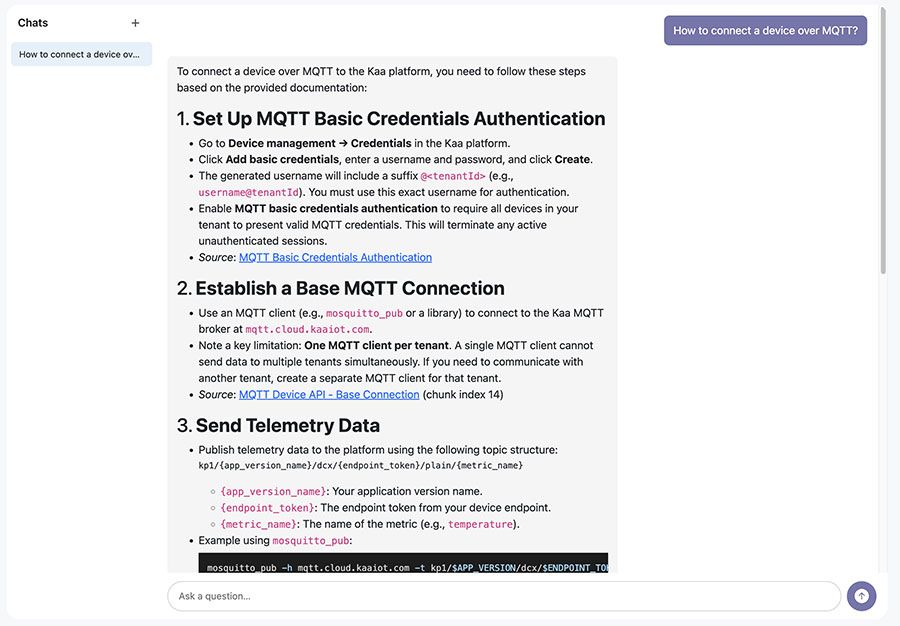
AI Assistant answering a question “Code example to send and handle commands?”
Why it matters – impact on development speed
The primary impact of an AI documentation assistant is speed and consistency.
First, it reduces the time required to locate information. Instead of navigating through multiple pages, developers can retrieve answers directly. This shortens feedback loops and keeps the development process focused.
Second, it lowers cognitive load. Engineers no longer need to remember where specific details are documented. The system becomes responsible for retrieving relevant information, allowing developers to focus on implementation.
Third, it accelerates onboarding. New team members can interact with the documentation more intuitively, asking questions rather than reverse-engineering the knowledge base's structure.
Finally, it reduces dependency on internal expertise. Teams spend less time answering repetitive questions and more time solving actual engineering problems.
In environments where multiple systems, protocols, and configurations intersect, these improvements compound quickly. What seems like a small optimization at the documentation level becomes a measurable gain in overall development efficiency.
Final words
If you are working with Kaa IoT, integrating devices, or building data pipelines, the AI assistant provides a more direct path to the information you need. Instead of navigating documentation, you interact with it – and that shift alone can significantly reduce friction in everyday development workflows.